



Creating fresh and engaging content consistently is often a challenge for marketers. With the ever-increasing demand for high-quality content, you should maximize the value of each piece. And this is where content repurposing proves helpful.
Content repurposing creatively transforms the content into new formats and channels. This makes it fresh and appealing to different segments of your audience.
With content repurposing, marketers can extend the life and reach of their content, hence boosting marketing efficiency.
Effective content repurposing has several benefits which include:
- Saves time and resources: Repurpose existing content instead of creating entirely new pieces.
- Boosts SEO: More content around relevant keywords increases search engine ranking.
- Reaches new audiences: Caters to different content preferences (videos, infographics, etc.).
- Extends content lifespan: Gets more mileage out of your creative efforts.
- Increases brand awareness: Gets your content seen by a wider audience.
- Improves engagement: Offers content in formats audiences prefer to cons
Essential Elements of a Content Repurposing Workflow
What's a content repurpose workflow? It's a systematic process for taking your existing content and transforming it into new formats for different platforms. For example, by turning a blog post into a podcast, YouTube video, or even a social media post.
Therefore for a successful content repurposing, you'll need an effective workflow. Here's what you'll need to create a content repurposing workflow:
Content Audit
First, conduct a content audit to identify pieces that have the potential to be adapted into other formats: Do this by,
- Compiling a list of all existing content
- Analyzing performance metrics (traffic, engagement, conversions) to identify high-performing pieces
- Categorizing content based on type, topic, and format
Identifying High-Performing Content
Look for content that resonates well with your audience. Here are the criteria for identifying content that is worth repurposing.
- Evergreen content that remains relevant over time
- High-performing content with high engagement rates, numerous shares, and excellent feedback.
- Content that aligns with current marketing goals and audience interests
Step-by-Step Content Repurposing Workflow

1. Planning and Strategy
Start with a plan. Imagine setting sail without a map—you’d be lost before you even leave the shore. Similarly, a solid plan forms the backbone of an effective content repurposing strategy.
- Setting goals: What do you hope to achieve with your repurposed content? More traffic, higher engagement, or perhaps better SEO rankings? Clearly define your objectives.
- Identifying target audience: Understand who you’re talking to. Different audiences prefer different formats. Tailor your repurposed content to meet their needs and consumption habits.
- Set measurable objectives: Establish key performance indicators (KPIs) to track the success of your repurposed content.
2. Content Transformation
Your original content is the cornerstone of your repurposing efforts. It can be a blog post, an engaging webinar, or an informative white paper. So you'll adapt the content into the chosen formats. Below are some creative content repurposing techniques.
- Blog to video: Turn a well-researched blog post into a short, engaging video. This is for those who prefer visual content to written ones. You can share videos on Instagram, YouTube, TikTok, and Facebook.
- Webinar to ebook or blog: Break down the webinar into several blog posts, each focusing on a specific topic. Or a comprehensive ebook. This serves as a lead magnet to grow your email list.
- Social media posts from podcasts: Break down long podcast episodes into bite-sized quotes or snippets for social media. This keeps your audience engaged without overwhelming them with information.
Having repurposed the content, the next step is to get it in front of your audience. Different types of content perform better on different platforms.
Videos might shine on YouTube and Instagram, while infographics could find a home on Pinterest and LinkedIn.
3. Analyze and Refine
Lastly, measure the effectiveness of your repurposing strategy. This allows you to tweak and optimize future efforts.
Pay attention to metrics that align with your goals, such as engagement rates, shares, and conversions.
Use analytics tools like Google Analytics, and social media insights to monitor engagement and traffic.
You can also set up UTM parameters to track the effectiveness of each piece of repurposed content.
This data will help you understand what’s working and what isn’t. Helping you data-driven decisions to improve future repurposing efforts.
Content Repurposing Workflow Template (SOP)
To help you get started with content repurposing, here is a comprehensive workflow template. Use this template to organize and streamline your repurposing efforts.
- Step 1: Content Audit
Objective: Identify high-potential content for repurposing.
Tasks:- Compile a list of all existing content.
- Analyze performance metrics (traffic, engagement, conversions).
- List high-performing content pieces.
- Categorize content by type, topic, and format.
- Note their performance metrics and potential repurposing formats.
Useful tools:
Google Analytics, social media insights, content management system analytics.
Here is an example of a content inventory that can get you started with your auditing processes.
- Step 2: Strategy Outline
Objective: Define what you aim to achieve with repurposed content.
Tasks:- Determine specific goals (brand awareness, lead generation, etc.).
- Define your target audience.
- Assign specific formats for repurposing
- Set measurable objectives (KPIs).
- Step 3: Repurposing Calendar
Objective: Develop a detailed plan to guide repurposing efforts.
Tasks:- Outline a content calendar.
- Assign roles and responsibilities to team members.
Tools: Trello, Google Docs, project management tools.
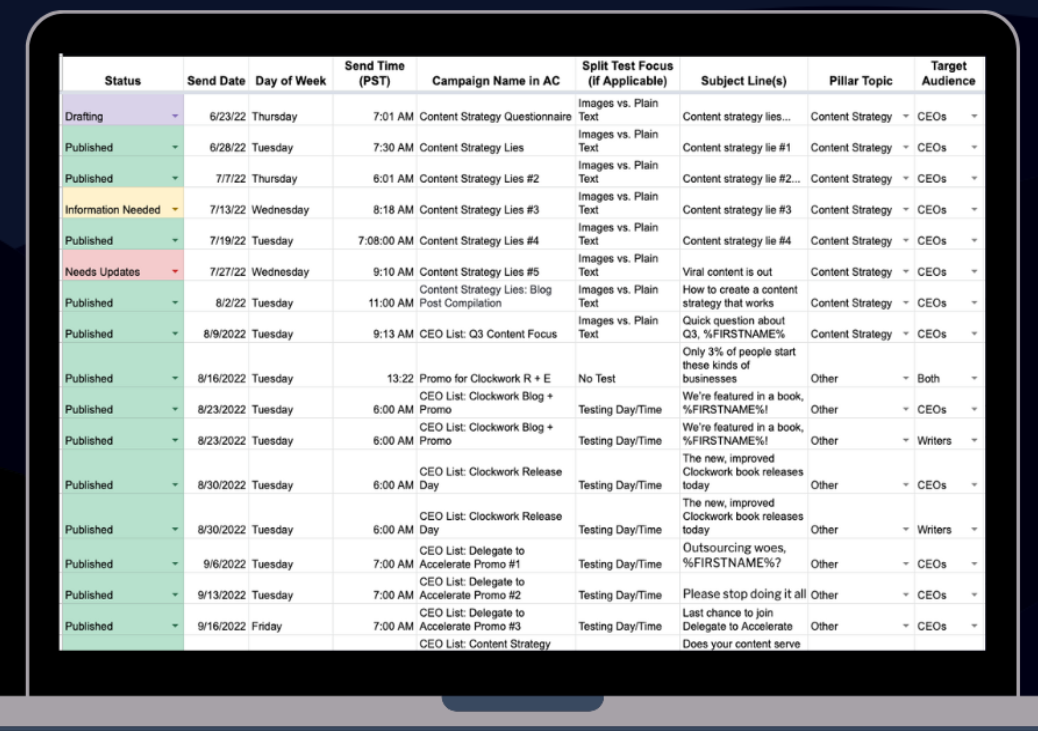 Alt: content inventory spreadsheet
- Step 5: Transform
Objective: Adapt the content into selected formats.
Tasks:- Create scripts, designs, and edits for new formats.
- Ensure the content fits platform-specific guidelines.
Tools: Adobe Creative Suite, Canva, video editing tools.
- Step 6: Distribute
Objective: Share the repurposed content across various channels.
Tasks:- Optimize content for each platform.
- Use scheduling tools for consistent posting.
Tools: Hootsuite, Buffer, CoSchedule.
- Step 7: Analyze and Refine
Objective: Track performance and make necessary adjustments.
Tasks:- Monitor engagement, traffic, and conversions.
- Use analytics to refine the repurposing strategy.
Tools: Google Analytics, social media insights, Hotjar.
Tools and Resources for Efficient Repurposing
Content Creation
Edyt.ai is an AI-powered tool designed to simplify content creation. It helps generate, optimize, and edit text, making it a valuable resource for creating blog posts that initiate action.
With its advanced algorithms, Edyt.ai can enhance the quality of your writing, suggest improvements, and even help with idea generation.
See how Edyt.ai helps in blog outline generation below.

Grammarly is a widely used writing assistant that checks for grammar, punctuation, spelling, and style errors. It ensures your content is polished and professional.
Grammarly offers suggestions to improve readability and clarity.
Trello is a project management tool that uses boards, lists, and cards to help you organize tasks.
For content planning, it allows you to create a content calendar, assign tasks to team members, and track the progress of your repurposing projects. Its visual interface makes it easy to manage and prioritize tasks.
Google Docs is a cloud-based word-processing tool that facilitates real-time collaboration. Multiple users can work on a document simultaneously. This makes it ideal for team-based content creation.
Google Docs also supports commenting and version history. This ensures smooth collaboration and easy tracking of changes.
Content Transformation
 Alt: Lumen5 blog post video
Adobe Creative Suite includes a range of professional-grade tools for content creation and transformation.
Key applications like Adobe Photoshop, Illustrator, and Premiere Pro allow you to design graphics, create videos, and edit multimedia content. These tools are essential for high-quality content repurposing.
Lumen5 is a video creation platform that transforms text-based content into engaging videos. It uses AI to match your text with relevant images, video clips, and music.
Lumen5 is useful for turning blog posts, articles, and social media updates into videos. This enhances your content’s visual appeal.
Anchor is a podcast creation and hosting platform. It allows you to record, edit, and distribute podcasts easily.
With Anchor, you can repurpose blog posts or videos into audio format. This enables you to reach audiences who prefer podcasts.
The platform also provides analytics to track your podcast’s performance
Content Distribution
Hootsuite is a social media management tool. It enables you to schedule and publish posts across multiple social media platforms.
It offers features for:
- Monitoring social media activity
- Engaging with your audience, and
- Analyzing performance metrics
Hootsuite helps streamline your content distribution process, ensuring consistent posting.
Buffer is another social media management tool that focuses on scheduling and publishing content. It provides a simple interface to plan and queue posts for various social media channels.
It also offers analytics to measure engagement and performance. This helps you optimize your social media strategy.

CoSchedule combines content scheduling with project management features. It allows you to plan, publish, and promote content from a single platform.
CoSchedule’s editorial calendar helps you organize your content strategy. On the other hand, its social media automation features ensure timely and consistent posting.
Analytics
Google Analytics is a for tracking and analyzing website traffic and user behavior. It provides insights into how your content is performing, including metrics like page views, bounce rates, and conversion rates.
Google Analytics helps you understand which content suits your audience. This informs your repurposing strategy.

Hotjar is a user experience analytics tool that provides heatmaps, session recordings, and feedback polls. It helps you understand how users interact with your content, revealing areas for improvement.
Hotjar’s insights can guide your content transformation efforts, ensuring your repurposed content meets user needs.
Most social media platforms offer built-in analytics tools. These tools track engagement, reach, and audience demographics. Facebook Insights, Twitter Analytics, and Instagram Insights are examples of such tools.
These analytics provide data on how your repurposed content performs on social media. Hence, allowing you to refine your strategy based on real-time feedback.
Best Practices for Seamless Content Repurposing
- Maintaining Content Quality
Quality should never be compromised for the sake of quantity. Here’s how to ensure your repurposed content remains high-caliber:
- Consistent Voice and Tone: Make sure that your brand’s voice remains consistent across all formats. Whether it's a blog or a social media post, your audience should always recognize your style.
- Tailored content: Adapt the content to fit the platform's unique characteristics. A video script might need to be more concise than a blog post, and visuals might need reworking to fit the Instagram aesthetic.
- Keeping the Audience Engaged
Your audience should find value in your content, regardless of the format. Here’s how to keep them hooked:
- Interactive elements: Include polls, quizzes, or Q&A sessions in your repurposed content to engage your audience actively.
- Regular updates: Refresh your content periodically to keep it relevant. A how-to blog from two years ago might need new data or trends to stay current.
Common Challenges and How to Overcome Them
Even with the best plans in place, challenges can arise. Here’s how to navigate some common obstacles in content repurposing.
- Time management
Repurposing can sometimes feel like an additional workload rather than a time-saver. Here’s how to manage your time effectively:
- Batch processing: Work on similar tasks together. For example, create multiple video scripts in one go or design several infographics at once.
- Set clear deadlines: Having clear timelines for each stage of the repurposing process helps keep everything on track.
- Consistency Across Formats
Maintaining consistency can be tough when the same content exists in multiple formats. Here’s how to ensure a uniform message:
- Centralized content guidelines: Maintain a set of guidelines that outline your brand’s voice, style, and messaging. Share these with everyone involved in the content creation process.
- Review process: Establish a thorough review process for all repurposed content. This ensures consistency and quality across formats.
- Ensuring Freshness of Repurposed Content
Old content can feel outdated, even in a new format. Here’s how to keep it fresh:
- Update stats and examples: Refresh any statistics, case studies, or examples to ensure they are current.
- Add new insights: Incorporate recent trends, new insights, or additional information to add extra value.
Conclusion
Using a content repurpose workflow maximizes the value of your existing content. Allowing you to reach a broader audience and achieve greater marketing efficiency.
Systematically transforming and distributing content across various platforms ensures a wider audience reach.
With tools like Edyt.ai, Adobe Creative Suite, and Hootsuite, you can streamline this process and produce high-quality repurposed content.
So start optimizing your content today and witness the transformative impact on your marketing success.